> For the complete documentation index, see [llms.txt](https://easify.gitbook.io/easify-product-options/llms.txt). Markdown versions of documentation pages are available by appending `.md` to page URLs; this page is available as [Markdown](https://easify.gitbook.io/easify-product-options/analytics-and-orders/introduction-to-order-management.md).
# Introduction to Order Management
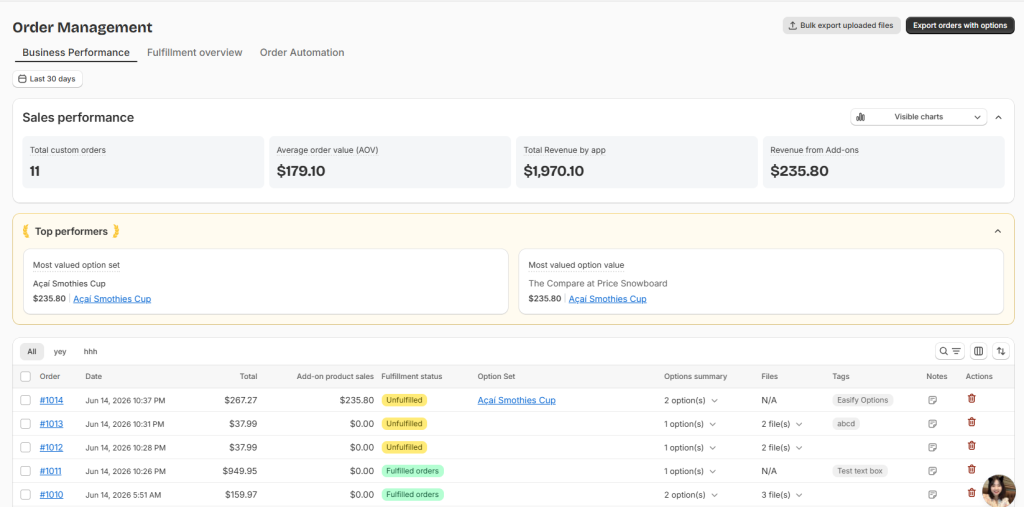
Stop digging through Shopify Orders to figure out which custom orders need your attention. Easify Product Options Order Management gives you one workspace to see your custom order workload at a glance, filter down to exactly the orders you need, and pull files and option details without the back-and-forth.
This hub is built specifically for orders that contain Easify options — it’s not meant to replace your Shopify Orders page, just to make working with customized orders faster and less error-prone.
### How It Works
The Order hub is organized into a few areas, each answering a different question:
* **Business Performance** — how are your custom orders doing overall (revenue, volume, best-selling options)?
* **Fulfillment Snapshot** — what’s the current workload and what needs to happen next?
* **List of Orders** — the working table where you scan, filter, and act on individual orders. Covered in separate guides.
* **Order Automation** (Order Tags and Order Notes) — set up rules that tag and annotate orders automatically. Covered in separate guides.
{% hint style="info" %}
**Plan Availability**:
* Business Performance Analytics is available on all plans.
* Fulfillment Snapshot Analytics is available on all plans
* List of Orders requires the **Pro** plan and above.
* Order Automation, Bulk File Upload Download, and Export Order Files require the **Premium** plan and above.
{% endhint %}
### Why It Matters?
✅ **See What Needs Attention First** Open backlog, overdue orders, and orders you’ve flagged all surface automatically, so you know what to work on before you start scrolling through a long order list.
🛒 **Less Back-and-Forth on Production** Option details, customer uploads, and notes live right next to each order, so you’re not jumping between Shopify, your inbox, and a spreadsheet just to fulfill one custom item.
🎨 **Built for Volume** Bulk actions, saved filters, and exports mean a 5-order day and a 500-order day both stay manageable.
### What’s Next?
* Learn more about [Business Performance](/easify-product-options/analytics-and-orders/track-business-performance-analytics.md)
* Learn more about [Fulfillment Snapshot](/easify-product-options/analytics-and-orders/view-fulfillment-snapshot-of-orders.md)
* Automate your working flow with [Order Notes & Tags](/easify-product-options/analytics-and-orders/automate-workflows-with-order-tags-order-notes.md)
* [View and Export Orders & Files](/easify-product-options/analytics-and-orders/view-export-orders-and-order-files.md)