> For the complete documentation index, see [llms.txt](https://easify.gitbook.io/easify-box-bundle-builder-docs/llms.txt). Markdown versions of documentation pages are available by appending `.md` to page URLs; this page is available as [Markdown](https://easify.gitbook.io/easify-box-bundle-builder-docs/user-guide/getting-started/enable-the-app-embed.md).

# Enable the App Embed

Enable the App Embed so Easify Box Builder can load its storefront functionality on the selected Shopify theme.

After installing the **Easify Box Builder** app, follow the steps below to activate it on your current Shopify theme. This step is required to make your “Build a Box” pages appear on your storefront.

### Option 1: Enable it from App Status <a href="#id-0-toc-title" id="id-0-toc-title"></a>

{% stepper %}
{% step %}

### Step 1: Select the theme

* Open the **Easify Box Builder** app.
* In the **App Status** section, use the **theme selector** to choose the theme where you want **Easify Box Builder** to run. The **Live** badge identifies your published theme.

<figure><img src="https://2136649288-files.gitbook.io/~/files/v0/b/gitbook-x-prod.appspot.com/o/spaces%2FMSHFLDPGBWSkDmxkdLpP%2Fuploads%2FxwcmBH0DcR3tG41WvUmr%2FBABA-%C2%B7-Easify-Box-Builder-%C2%B7-Shopify-09-04-2026_11_17_AM.png?alt=media&amp;token=5996f5f1-9b75-4bdb-83f1-8cd609492b0f" alt=""><figcaption></figcaption></figure>
{% endstep %}

{% step %}

### Step 2: Enable the App Embed and save

* Under **App embed**, click **Enable app**

<figure><img src="https://2136649288-files.gitbook.io/~/files/v0/b/gitbook-x-prod.appspot.com/o/spaces%2FMSHFLDPGBWSkDmxkdLpP%2Fuploads%2F3DS3wRsTdMqltR0RmhEK%2FBABA%20%C2%B7%20Easify%20Box%20Builder%20%C2%B7%20Shopify%20(10).png?alt=media&amp;token=b7d583cc-1b5f-4caf-8cef-d4807af25add" alt=""><figcaption></figcaption></figure>

* You’ll be taken directly to the **Theme Editor** with the **App embeds** section already open and **Easify Box Builder Enabled**.

<figure><img src="https://2136649288-files.gitbook.io/~/files/v0/b/gitbook-x-prod.appspot.com/o/spaces%2FMSHFLDPGBWSkDmxkdLpP%2Fuploads%2FDNmy7t5Qtt1Q8k1714cU%2FBABA-%C2%B7-Edit-Horizon-%C2%B7-Shopify-08-28-2026_02_25_PM.png?alt=media&amp;token=3790e6df-2b11-41a8-a0ef-b68d73cd441d" alt=""><figcaption></figcaption></figure>

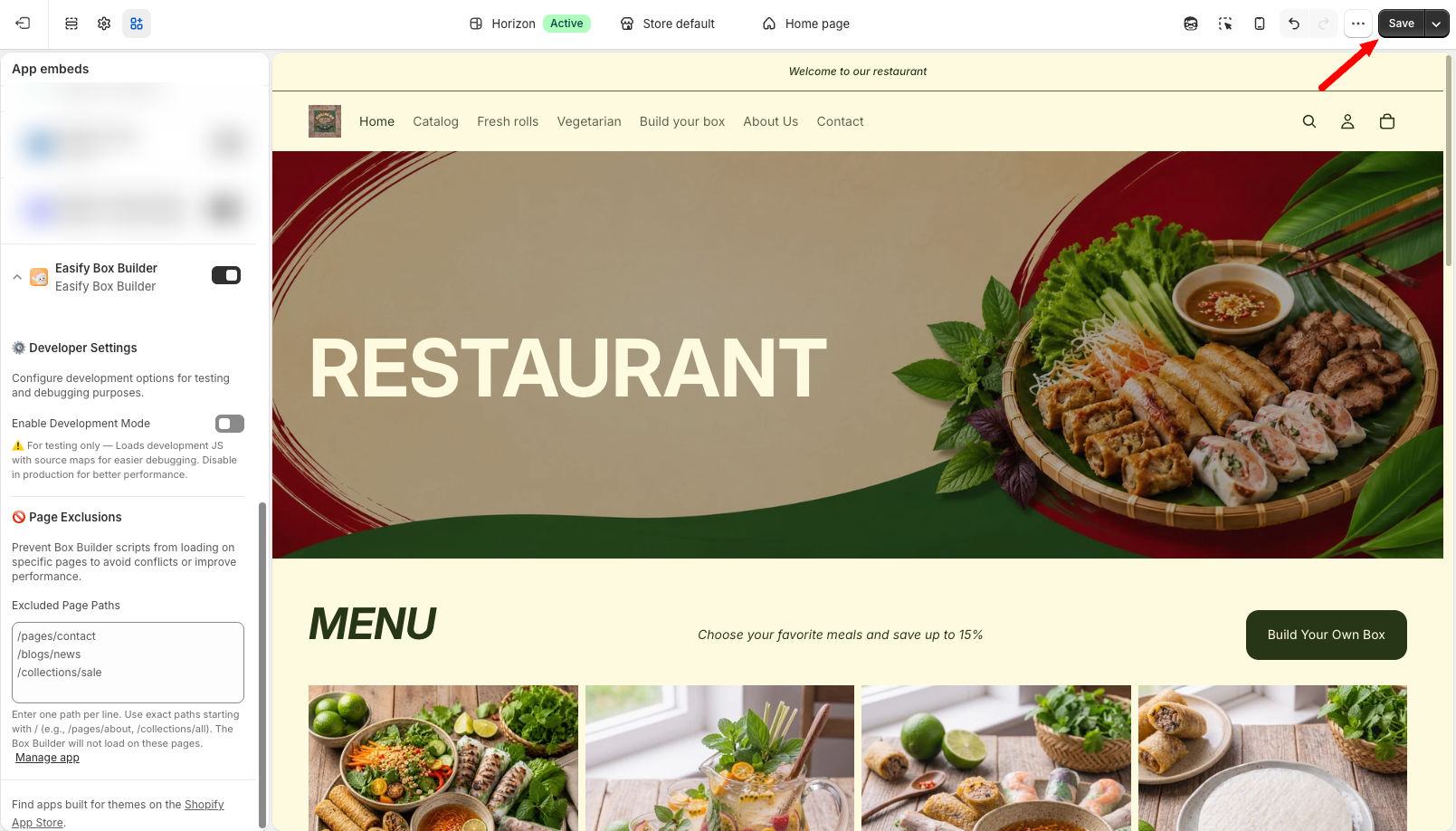
* Click **Save** in the top-right corner to apply the change.

<figure><img src="https://2136649288-files.gitbook.io/~/files/v0/b/gitbook-x-prod.appspot.com/o/spaces%2FMSHFLDPGBWSkDmxkdLpP%2Fuploads%2F3EfvHhon79ZP4TQVdAzy%2FBABA-%C2%B7-Edit-Horizon-%C2%B7-Shopify-08-28-2026_02_27_PM.png?alt=media&amp;token=65b86024-982e-4c2e-833e-1f715e3d2a0c" alt=""><figcaption></figcaption></figure>
{% endstep %}

{% step %}

### Step 3: Verify the status

* Close the **Theme Editor** tab and return to **Easify Box Builder**. The **App embed** status will now show **Enabled.**

<figure><img src="https://2136649288-files.gitbook.io/~/files/v0/b/gitbook-x-prod.appspot.com/o/spaces%2FMSHFLDPGBWSkDmxkdLpP%2Fuploads%2FVBtbSQFdoPtrKI5dhYJh%2FBABA%20%C2%B7%20Easify%20Box%20Builder%20%C2%B7%20Shopify.png?alt=media&amp;token=c4f5b60e-982b-4883-88ae-5379667ee2d7" alt=""><figcaption></figcaption></figure>
{% endstep %}
{% endstepper %}

### Option 2: Enable it from Shopify Admin <a href="#id-2-toc-title" id="id-2-toc-title"></a>

{% stepper %}
{% step %}

### Step 1: Open the Theme Editor

* From your **Shopify admin**, go to **Sales channels > Online Store**.
* Find the theme you want to update, then click **Edit theme** next to that theme to open the **Theme Editor**.

<figure><img src="https://2136649288-files.gitbook.io/~/files/v0/b/gitbook-x-prod.appspot.com/o/spaces%2FMSHFLDPGBWSkDmxkdLpP%2Fuploads%2FuT7V5NqvZbjWmuN0B4fS%2FBABA%20%C2%B7%20Easify%20Box%20Builder%20%C2%B7%20Shopify.png?alt=media&amp;token=e780d170-cd3e-4fc1-a4a5-3a05c29f7961" alt=""><figcaption></figcaption></figure>
{% endstep %}

{% step %}

### Step 2: Open App embeds

* In the **Theme Editor,** open the **App embeds** tab.

<figure><img src="https://2136649288-files.gitbook.io/~/files/v0/b/gitbook-x-prod.appspot.com/o/spaces%2FMSHFLDPGBWSkDmxkdLpP%2Fuploads%2FikgM21G7xKYjxe0eJ17X%2FBABA%20%C2%B7%20Edit%20Horizon%20%C2%B7%20Shopify.png?alt=media&amp;token=b077b5bf-844d-4d69-aefb-4ae1cdd9a376" alt=""><figcaption></figcaption></figure>

* Use the **search bar** to find **Easify Box Builder.**

<figure><img src="https://2136649288-files.gitbook.io/~/files/v0/b/gitbook-x-prod.appspot.com/o/spaces%2FMSHFLDPGBWSkDmxkdLpP%2Fuploads%2Fvuw0GDZ6XTMLf2Y1rFYe%2FBABA%20%C2%B7%20Edit%20Horizon%20%C2%B7%20Shopify%20(1).png?alt=media&amp;token=a01b608e-50e6-4e96-ac1f-54facded8432" alt=""><figcaption></figcaption></figure>
{% endstep %}

{% step %}

### Step 3: Enable and save

* Toggle the switch to **enable** the app.

<figure><img src="https://2136649288-files.gitbook.io/~/files/v0/b/gitbook-x-prod.appspot.com/o/spaces%2FMSHFLDPGBWSkDmxkdLpP%2Fuploads%2FRuq22a9pAtnUHsacDlcZ%2FBABA-%C2%B7-Edit-Horizon-%C2%B7-Shopify-08-28-2026_02_25_PM.png?alt=media&amp;token=4c2893b4-6c76-42e1-96ad-bbb191541c5f" alt=""><figcaption></figcaption></figure>

* Click **Save** to apply changes.

<figure><img src="https://2136649288-files.gitbook.io/~/files/v0/b/gitbook-x-prod.appspot.com/o/spaces%2FMSHFLDPGBWSkDmxkdLpP%2Fuploads%2FzpEV7v2hRqAAjHaNPG2V%2FBABA-%C2%B7-Edit-Horizon-%C2%B7-Shopify-08-28-2026_02_27_PM.png?alt=media&amp;token=b91d05b3-b388-4cc8-b1a8-926cc822b6be" alt=""><figcaption></figcaption></figure>
{% endstep %}
{% endstepper %}

#### How to Double-Check If It’s Enabled <a href="#id-4-toc-title" id="id-4-toc-title"></a>

To confirm that the **App embed** is enabled:

* Go back to the **App Status**.
* If activation was successful, the **App embed** status will now show **Enabled.**

<figure><img src="https://2136649288-files.gitbook.io/~/files/v0/b/gitbook-x-prod.appspot.com/o/spaces%2FMSHFLDPGBWSkDmxkdLpP%2Fuploads%2FiRRGai8Is8gLIFC3xdkK%2FBABA%20%C2%B7%20Easify%20Box%20Builder%20%C2%B7%20Shopify%20(1).png?alt=media&amp;token=b1644d02-2282-49f4-897a-e7d2dd1bbfc3" alt=""><figcaption></figcaption></figure>

## Need Help? <a href="#id-2-toc-title" id="id-2-toc-title"></a>

If you run into any issues, feel free to reach out via our **in-app live chat**.\
We’re always here to help!