> For the complete documentation index, see [llms.txt](https://easify.gitbook.io/easify-box-bundle-builder-docs/llms.txt). Markdown versions of documentation pages are available by appending `.md` to page URLs; this page is available as [Markdown](https://easify.gitbook.io/easify-box-bundle-builder-docs/sales-lab/first-sale-cheat-sheet/check-order-details-everything-in-the-right-place.md).
# Check Order Details – Everything in the Right Place
You’ve tested the box page. You’ve tested cart and checkout. Now there’s one final place to verify: the order detail page.
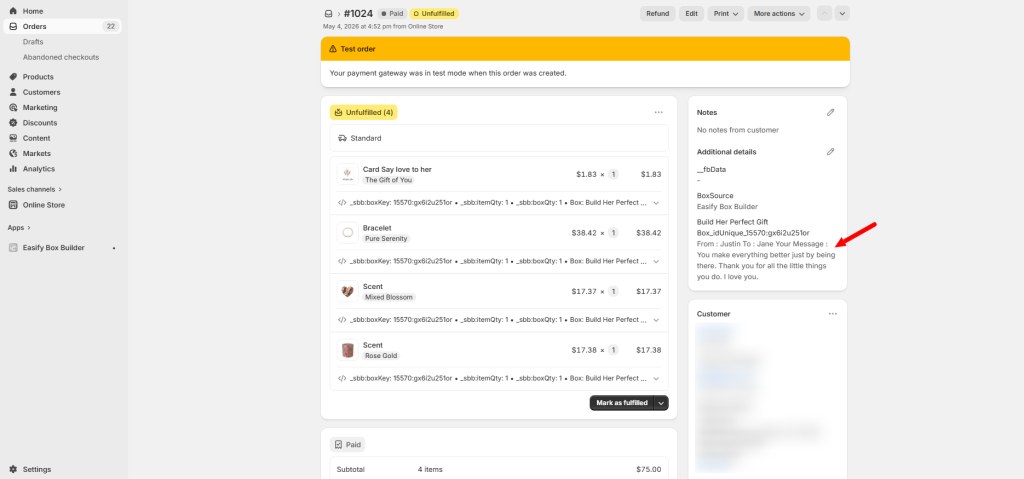
This is where you and your customer see exactly what was purchased. Box contents, customizations, prices, discounts – everything needs to be correct and clearly displayed. If something is missing or looks wrong here, it creates confusion and support tickets.
**🎯 Why this helps you get that first order**
A clean, accurate order detail page builds trust after the purchase. Customers feel confident they got what they paid for. And for you, it means fewer “Did my order go through?” emails and more time focusing on the next sale.
### What to check on the order detail page
* All selected products inside the box are listed
* Custom fields (messages, engraving, etc.) show up correctly
* The total price matches what was paid
* Discounts are applied and visible
* Quantities are accurate
### How to check
The best way to verify is to run a test purchase. You don’t need to spend real money. Here are three ways to do it:
{% tabs %}
{% tab title="Option 1" %}
**Follow** [**Shopify’s test order guide**](https://help.shopify.com/en/manual/checkout-settings/test-orders/payments-test-mode)
Shopify has a built-in way to place test orders without charging real payment methods. This is the safest and cleanest method.
{% endtab %}
{% tab title="Option 2" %}
**Use a 100% OFF discount code**
Create a discount code that makes the entire box free. Place an order using that code. You’ll see the full order flow without any charge.
{% endtab %}
{% tab title="Option 3" %}
**Place a real order and refund it**
If you want to test the actual payment process, place a real order using your own credit card or PayPal. Then refund it immediately after. This costs nothing (fees may or may not be refunded depending on your payment provider) but confirms the real customer experience.
{% endtab %}
{% endtabs %}
### Need assistance?
If something on the order detail page doesn’t look right, click the live chat in the bottom-left corner. We’ll help you figure out what went wrong and how to fix it.
---
# Agent Instructions
This documentation is published with GitBook. GitBook is the documentation platform designed so that both humans and AI agents can read, navigate, and reason over technical content effectively. Learn more at gitbook.com.
## Querying This Documentation
If you need additional information that is not directly available in this page, you can query the documentation dynamically by asking a question.
Perform an HTTP GET request on the current page URL with the `ask` query parameter:
```
GET https://easify.gitbook.io/easify-box-bundle-builder-docs/sales-lab/first-sale-cheat-sheet/check-order-details-everything-in-the-right-place.md?ask=
```
The question should be specific, self-contained, and written in natural language.
The response will contain a direct answer to the question and relevant excerpts and sources from the documentation.
Use this mechanism when the answer is not explicitly present in the current page, you need clarification or additional context, or you want to retrieve related documentation sections.